Release Notes — v1.5
Release date: March 2026
This release adds thread flow visualization, execution timeline SVGs, data waterfall charts, and enhanced result reports — delivering rich inline diagrams and improved notebook rendering across all execution modes.
Thread Flow Diagrams
config.flow() — Processing Pipeline SVG
Thread configs now expose a flow() method that returns a FlowDiagram
object showing the thread's processing pipeline: sources, joins,
transforms, and target.
config = ctx.load("stg_customers.thread")
flow = config.flow()
flow.save("pipeline.svg")   # export to file
flow                         # renders inline in a notebook
Join sources are positioned above their target join node to show the data flow clearly. Primary sources appear on the left with horizontal arrows through the transform chain.
flow() is only available for thread configs — weave and loom configs
return None.

fact_orders thread with two join sources,
filters, derives, and a merge target.Dark Mode Support
All SVG renderers accept a dark keyword argument to force a specific
color palette:
config.flow(dark=True)    # force dark palette
result.dag(dark=False)    # force light palette
result.dag()              # auto-detect via prefers-color-scheme (default)
Execution Timeline SVG
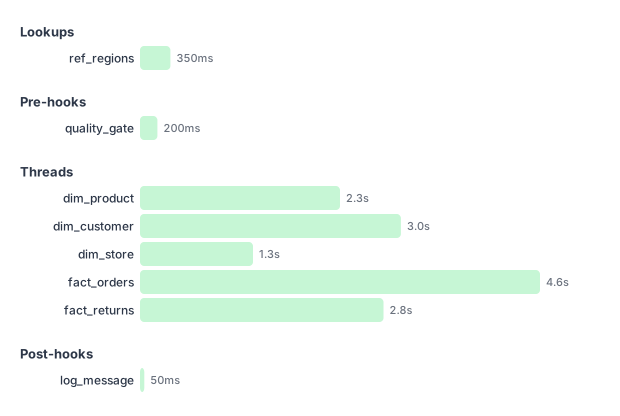
Execute mode results for weave and loom runs now include a phased execution timeline Gantt chart. The timeline shows lookups, pre-hooks, thread execution groups, and post-hooks as sequential phases with wall-clock duration bars.
Data Waterfall SVG
Per-thread results include a data waterfall chart showing row counts at each processing stage: rows read, after transforms, quarantined, and rows written. Preview mode shows the first two stages only.
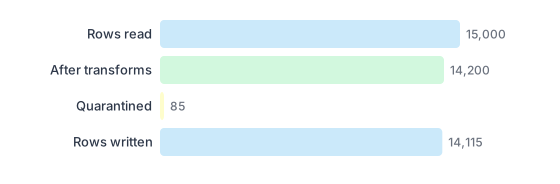
fact_orders:
15,000 rows read, 14,200 after transforms,
85 quarantined, 14,115 written.Annotated DAG SVG
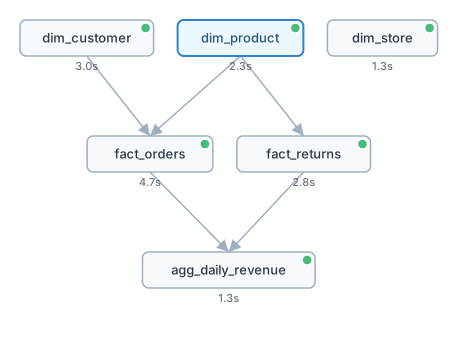
Execute mode results include an annotated DAG with colored status badges (success/failure/skipped) and duration annotations on each thread node.
Enhanced Execute Mode Reports
Execute mode notebook rendering now includes:
- Executive summary — status, duration, thread/row counts
- Per-thread detail — expandable sections with flow diagrams, data waterfalls, output schema, and data samples
- Execution timeline — phased Gantt chart (weave/loom runs)
- Annotated DAG — status-badged dependency graph (weave/loom runs)
Enhanced Preview Mode Reports
Preview mode notebook rendering now includes per-thread expandable sections with output schema tables and data sample previews with row numbers.
Telemetry Enhancements
ThreadResultnow carriesoutput_schemaandsamplesfieldsThreadTelemetryincludesrows_after_transformsfor waterfall chartsresolved_paramsis available on all telemetry levels (thread, weave, loom) for the outermost execution scope
New Public Exports
FlowDiagramis now exported fromweevr.engine
Compatibility
No breaking changes. All existing configurations and API usage continue to work without modification.
| Component | Version |
|---|---|
| Python | 3.11 |
| PySpark | 3.5.x |
| Delta Lake | 3.2.x |
| Microsoft Fabric Runtime | 1.3 |